Blog
Blog  25-May-2026
.svg) 174,990
174,990 

Table of Content
A trader using Claude, Cursor, or Codex can now place an order on a cTrader funded account by typing one sentence. A month ago, that required a custom integration and a week of developer time. Today, on every AIProp funded account, it takes two lines of configuration. cTrader shipped a Model Context Protocol (MCP) server in May 2026 [1, 6]. AIProp is the first prop firm to wire it into a live funded-account workflow.
Why this matters now
For two years, the AI-trader conversation has been stuck at the same wall. AI tools like Claude, ChatGPT, Cursor, and Codex can read sentiment, summarise earnings calls, and stress-test a thesis in 30 seconds. But they could not push the button. Every serious attempt to let an AI trade ended at the same bottleneck: a fragile custom connection that broke the first time the broker changed its settings.
MCP – Model Context Protocol – is a standard Anthropic released on 25 November 2024 to solve exactly this [7]. Think of it as a universal plug. It lets any AI assistant – Claude, ChatGPT Codex, Cursor, Windsurf, Gemini – connect securely to an external system and take real actions inside it. Files, databases, design tools, and now, brokers [1].
cTrader is the first major retail trading platform to ship a built-in MCP server for FX/CFD trading as a default, in-product feature rather than a third-party add-on [6]. (TraderEvolution shipped a separate MCP server in January 2026, but it is not built into the platform itself.) cTrader serves more than 11 million traders across 300+ brokers and prop firms, and the release is free for every cTrader account [2, 6]. AIProp accounts run on the new funded trading infrastructure built on Coinstrat Pro, which operates on the cTrader stack [10, 12]; MCP is live on AIProp funded accounts as of 14 May 2026, the same day cTrader shipped the servers [1, 6].
The three-layer stack that makes this work
Three things had to line up before an AI assistant could be trusted near a real trading account.
Layer 1 – Execution (cTrader’s MCP servers). cTrader ships two servers. The Local server runs alongside cTrader Windows and gives the AI full access – trading, account info, charts, indicators, plugins, UI layout, and price alerts [3]. The Remote server runs in your browser (cTrader Web) and covers the essentials – trading, account, and market data [4]. Here is what most people miss: your AI does not need to understand anything about how cTrader works under the hood. It just calls a tool by name and the MCP server takes care of the rest. No coding required on your end.
Layer 2 – Risk (AIProp’s funded-account rules). This is the layer that actually makes this safe to run. An AI with no guardrails on a funded account is a fast way to blow a daily loss limit. AIProp’s existing rules – trailing drawdown, daily loss caps, position-size limits – apply to every order the AI places, the same as if you placed it yourself. The limits are enforced at the broker level, not by the AI. On top of that, cTrader’s Local server has a “Require confirmation for trading operations” toggle. Turn it on, and the AI proposes every order for your approval before it goes live [2].
Layer 3 – Behaviour (the part that is genuinely new). AIProp exclusive research shows that AI-supported traders breach less, draw down less, and exit on emotion less than the manual baseline [8]. Having the AI in the loop does not just save clicks – it removes the emotional pressure associated with most account failures , and the confirmation step catches the impulse trade before it becomes a breach. AIProp’s AI coaching engine has been tracking this pattern across funded accounts for two years.
Proof (AIProp exclusive research, n=1,000 traders, April 2024 – March 2026): [8] – Breach rate: 8.5% (AI) vs 18.4% (manual) – 2.2x lower – Maximum drawdown: 4.3% (AI) vs 7.8% (manual) – 1.8x lower – Emotionally driven exits: 37.2% (AI) vs 61.7% (manual) – 1.7x lower – Revenge trading was the trigger in 73.0% of manual-cohort breaches
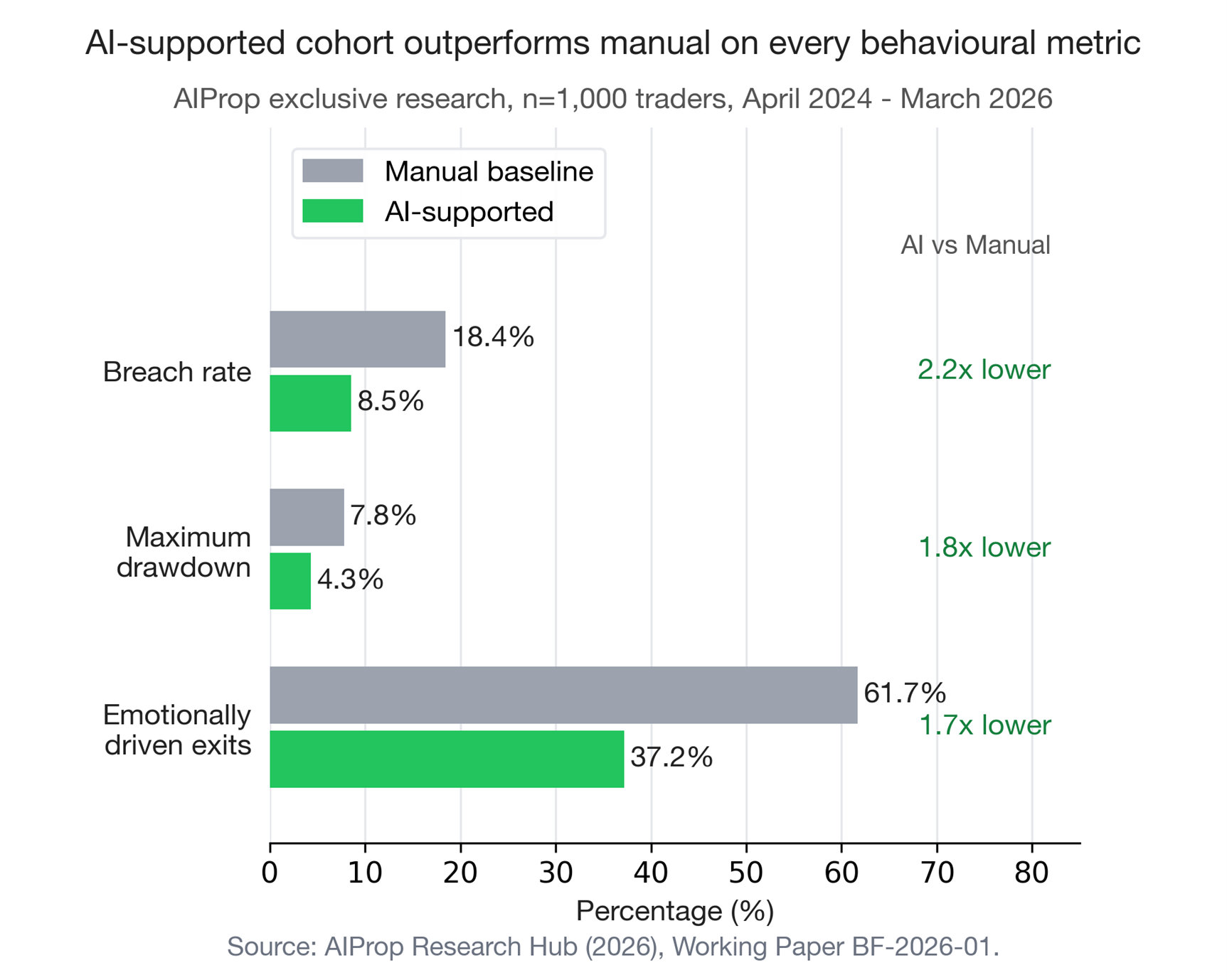
Figure 3 – AI-supported vs manual cohort outcomes (breach rate, drawdown, emotionally driven exits). AIProp exclusive research, n=1,000 traders, April 2024 – March 2026. Source: AIProp Research Hub (2026), Working Paper BF-2026-01.
Three implications for the prop trading industry
Anyone who chats with Claude, Cursor, or Codex is now the target user. This is not a feature for developers anymore. A trader who can read an AI’s suggested order and tap “approve” has access to the same kind of systematic, AI-assisted workflow that used to require a quant team – at the cost of an AI assistant subscription and a $99 evaluation fee. AIProp has run unrestricted AI bots on funded accounts since June 2025; 61.0% of funded traders already use them [12]. Most of those traders have been waiting for a simpler path than MetaTrader’s expert advisors. They now have it.
The prop firm pitch is changing. For a decade, it has been: we give you capital, you give us a profit split. The next pitch is: we give you a risk-bounded execution rail your AI can call, and we share in the upside it generates. The capital is still there. The rail is what sets firms apart.
The competitive window is open, but it will not stay that way. As of 14 May 2026, FTMO, FundedNext, Apex Trader Funding, and the rest of the 15-firm field have not shipped MCP-native funded accounts. cTrader’s release reaches 300+ broker and prop firm clients [6] ; the first firms to follow AIProp will be defining the next stage of AI-driven prop firm competition, and the rest will be catching up by the end of 2026. The pattern is already visible elsewhere: Meta shipped its own MCP server on 29 April 2026 with the same approach – open the connection, keep the safety gate on by default [11]. High-stakes platforms are all moving in the same direction.
The honest caveat
MCP is not magic. An AI that ignores stop losses still loses money – just faster. The data shows two outcomes: the top quartile of AI-supported traders outperforms the manual baseline by a real margin, while the bottom quartile fails the evaluation faster than baseline because the AI amplifies a bad thesis rather than fixing it [9]. The risk layer matters more than the AI layer. Anyone pitching this as “let your AI trade for you and retire” is selling a story, not a system.
What MCP changes is not whether any individual trade is a winner. It changes the speed of the cycle to get to a trade. A trader who used to spend three hours building a chart and writing a thesis can now spend ten minutes prompting an AI that has already read the chart, the earnings call, and the order book. The trade still has to be right. Getting there is just a lot faster.
Set it up in five minutes
Both MCP servers are available on every AIProp funded account by default – cTrader shipped them globally, no special AIProp setting required [2]. Pick the path that matches how you trade, then connect your AI in three to five minutes.
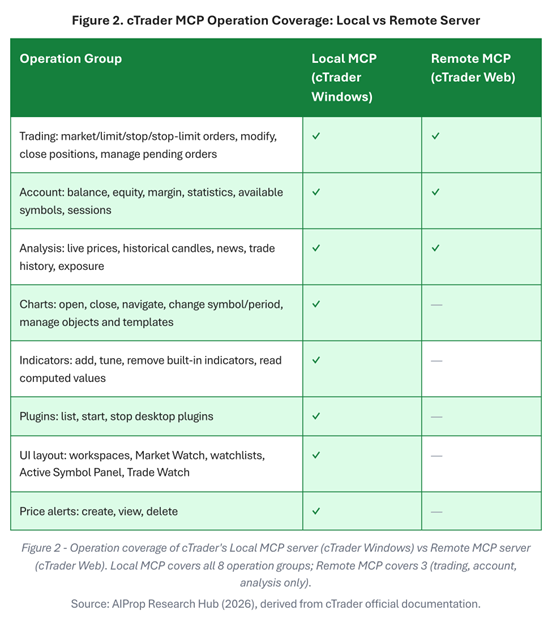
Figure 2 – Operation coverage of cTrader’s Local MCP server (cTrader Windows) vs Remote MCP server (cTrader Web). Source: AIProp Research Hub (2026), derived from cTrader official documentation.
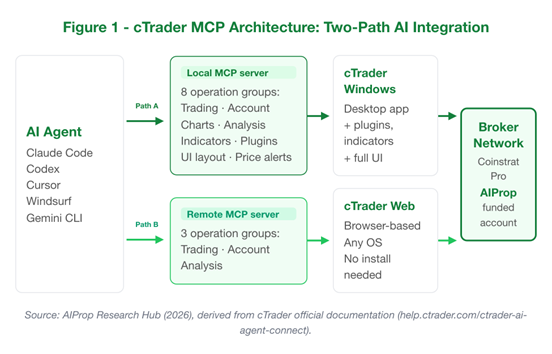
Figure 1 – cTrader MCP architecture: AI agent connects to either the Local server (cTrader Windows, full 8 operation groups) or the Remote server (cTrader Web, 3 operation groups), which then talks to the broker network. Source: AIProp Research Hub (2026), derived from cTrader official documentation.
Path A – Local MCP (cTrader Windows, full operation set)
Choose this if you trade from a Windows desktop and want the agent to control charts, indicators, plugins, UI layout, and price alerts in addition to placing orders [3].
1. In cTrader Windows: open Settings → MCP Server and tick Enable MCP server [2].
2. Recommended: tick Require confirmation for trading operations in the same panel. This routes every AI-proposed order through a human-approval prompt before it hits the broker [2].
3. Copy the configuration snippet from help.ctrader.com/ctrader-ai-agent-connect/local-mcp/setup/ and paste it into your AI client (Claude Code, Codex, Cursor, Windsurf, Gemini CLI are supported). The client updates its own MCP config and connects to the server [2].
4. Start a new session and prefix the first prompt with Using the cTrader local MCP server… so the agent routes calls to MCP instead of falling back on web search [2].
Path B – Remote MCP (cTrader Web, cross-platform)
This is the easiest starting point for most traders – and the recommended path if you have never set up a local integration before. It works on Mac, Linux, iPad, or any browser. Trading, account, and market-data calls all work; chart and UI control do not [4].
1. In cTrader Web: open Settings → Remote MCP [2].
2. Select the trading account you want the agent to connect to. cTrader issues a separate bearer token for each account [2].
3. Copy the configuration block plus the prompt from help.ctrader.com/ctrader-ai-agent-connect/remote-mcp/setup/ and paste both into your AI client. Two-pane copy/paste, one connection [2].
4. For multiple AIProp funded accounts: switch the account in the cTrader Web selector and copy the matching config for each one [2].
5. If the session expires, re-authenticate in cTrader Web and update the token in your AI client config [2].
Optional – install Spotware’s Skills package (one-time)
Spotware ships an open-source Skills package that teaches the AI agent how to use the MCP servers more effectively (better prompt patterns, fewer dead-end tool calls). Skills do NOT replace MCP setup; they sit on top [5].
1. Install Node.js 18 or newer.
2. In Terminal (macOS/Linux) or PowerShell (Windows), run: npx skills add https://github.com/spotware/ctrader-skills –all –global
3. Verify the install: npx skills ls -g
4. Restart your AI client so it loads the new skills.
5. Update later with: npx skills update -g -y
Troubleshooting (the three issues new users hit)
- The agent does not see the Local MCP server. Make sure cTrader Windows is open BEFORE you start the AI client, and confirm Enable MCP server is ticked [2].
- The agent ignores MCP and uses web search instead. Begin the prompt with Using the cTrader local MCP server… (or remote MCP server). This anchors the agent to the right tool surface [2].
- Remote session expired. cTrader Web bearer tokens expire with the web session. Re-authenticate and copy the new config [2].
Safety reminder
When MCP is enabled, the AI agent can place, modify, and close real orders on your funded account. AIProp’s risk envelope (trailing drawdown, daily loss caps, position-size limits) still applies, but the confirmation gate is the trader’s first line of defence inside Local MCP. cTrader is explicit: AI-generated outputs are not financial, investment, legal, or tax advice. Supervise the agent. Verify outputs before acting [1, 2].
Final word
Once your AI can place a trade, the question shifts from “what model do I use?” to “what guardrails does it live inside?” That question now has a clear answer on AIProp.
If you have not written a line of code but you use Claude, Cursor, or Codex daily, you can wire this up in under 10 minutes. Path B (Remote MCP) is the place to start.
AI-assisted trading is no longer a thesis. It is infrastructure now.
FAQ
Do I need to know how to code to use this?
No. If you can copy a config snippet from one window and paste it into another, you can set this up. Path B (Remote MCP) is browser-based and takes under five minutes – no terminal, no Node.js, no developer tools required.
Is it really free?
Yes. cTrader’s MCP servers are included with every cTrader account at no extra cost [2]. AIProp does not charge extra for the integration either. You only pay for your AI subscription (Claude, ChatGPT, Cursor, or whichever client you already use).
What happens if the AI makes a bad trade?
Two things protect you. First, cTrader’s Local MCP has a “Require confirmation for trading operations” toggle – turn it on and every order needs your tap before it goes live [2]. Second, AIProp’s risk envelope (trailing drawdown, daily loss caps, position-size limits) applies to AI-placed orders the same as your own. The AI cannot bypass them.
Do I have to use Windows?
No. Path B (Remote MCP) works on Mac, Linux, iPad, or any browser. You only need Windows if you want the full feature set – chart control, indicators, plugins, UI layout – via the Local server [3, 4].
Which AI client should I start with?
If you already use Claude, ChatGPT Codex, Cursor, Windsurf, or Gemini, start with that one. The setup is the same for all five [1]. If you have not picked one yet, Claude is the simplest entry point.
Can I run this on multiple AIProp accounts?
Yes. cTrader issues a separate bearer token for each trading account on the Remote MCP server [2]. Switch the account in cTrader Web, copy the matching config, and your AI client connects to that account. One AI agent can hold connections to several accounts in parallel.
Sources
1. Spotware Systems, cTrader AI Agent Connect – Introduction, 14 May 2026.
2. Spotware Systems, cTrader AI Agent Connect – FAQ, 14 May 2026.
3. Spotware Systems, cTrader local MCP server, 14 May 2026.
4. Spotware Systems, cTrader remote MCP server, 14 May 2026.
5. Spotware Systems, Skills – cTrader AI Agent Connect, 14 May 2026.
6. Finance Magnates, Spotware Opens cTrader to AI Agents as MCP Wave Catches Up With Retail Trading, 14 May 2026.
7. Anthropic, Introducing the Model Context Protocol, 25 November 2024.
8. AIProp Research Hub, Behavioral Biases in Prop Trading: Evidence from 1,000 AIProp Traders (Working Paper BF-2026-01), April 2026. n=1,000 trader cohort, April 2024 – March 2026.
9. AIProp Research Hub, Self-Directed vs AI-Supported Prop Traders: Evidence Review, April 2026.
10. Coinstrat Pro – cTrader-based multi-asset broker stack underpinning AIProp funded accounts.
11. PPC Land, Meta opens its ad system to Claude and ChatGPT with new AI connectors, 29 April 2026.
12. AIProp Research Hub, AIProp Company Profile, May 2026.